Categories
Xposed

Xposed For Zenfone Lollipop XposedInstaller 3.0 alpha4.apk & xposed-v67-sdk21-x86

UPDATE XPOSED INSTALLER V3 ALPHA 4 HERE !!
Xposed For Zenfone Lollipop “XposedInstaller_3.0_alpha4.apk & xposed-v67-sdk21-x86”

How to install :
Asus Zenfone Lollipop Rooted
Enable USB Debugging
Go to Homescreen
Connect usb to pc
Double click on “InstallxposedInstaller.bat”, this will install xposed app on your mobile.
Double click on “InstallxposedFramework.bat” file, this will install framework files in system.
Perhatikan di homescreen akan muncul supersu, pilih grant
After installing framework succesfully, will automatically restart
Link Download :
www.mediafire.com/?ux4r0ylrgci9mru

The files included :
Amplify Battery Extender Root Pro v3.09
Deep Sleep Battery Saver Pro v4.8
Fix Lollipop Memory Leak v1.2
Flat Style Bar Indicators Pro v0.6.4
Flat Style Colored Bars Pro v1.0.8.4
Flat Style Keyboard Pro 125
Greenify v2.6.2 (All features are unlocked)
iFont Donate v5.5.5
Lucky Patcher v5.6.8
Youtube Adaway v2.5.2

Categories
Firmware

UPDATE Version WW_3.23.40.60 (Android L)

Version WW_3.23.40.60 (Android L)

 
Description ASUS ZenFone 5(T00F/T00J) software Image: V3.23.40.60 (Android L) for WW SKU only*
Note1: Please make sure update software version after V2.22.40.53 or V2.22.40.54 first before update to software version V3.23.40.60
Note2: Download V2.22.40.53 or V2.22.40.54 from ASUS website if you don’t receive FOTA.
Note3. For V2.22.40.53 or V2.22.40.54 which you download from ASUS website, put the file to the device root directory directly.
Note5: If you had encrypted phone, please backup image and decrypt phone (reset) before update KK to Android L

* OS upgrade from KK to L
* Please note that Android 5.0 Lollipop does not support some pre-installed apps. The listed apps below will be removed once the Android 5.0 Lollipop upgrade is complete. The update and installation will take some time.
1. Battery widget
2. PhotoFrame widget
3. Google Text-To-Speech
4. Movie Studio
5. Cloud Print
6. CMClient
7. Magic Smoke Wallpapers

* Please note! Some features are added or changed in this system upgrade

1. SuperNote: change to link-downloading version
2. Asuswebstorage: change to link-downloading version
3. Remote Link: change to link-downloading version
4. Lockscreen: remove standalone wallpaper & weather info (only for 1GB RAM device)
5. Quick settings/Recent app layout change (only for 1GB RAM device)
6. Dialer/Contacts: reduce tab count from 5 to 3; remove group tab name/photo; remove foreground service (only for 1GB RAM device)
7. InCall screen: remove inCall animation & cover (only for 1GB RAM device)
8. Fix the problem of losing some files after changing the folder name in File Manager
9. Add KKBOX (link-downloading) (Taiwan only)
10. Add Dr. eye (link-downloading) (Taiwan only)
11. Add Zinio (link-downloading)
12. Add PubuBookBuffet (link-downloading) (Taiwan only)
13. Add eReadingNow (link-downloading) (Taiwan only)
14. Add ASUS Game Center (link-downloading) (Taiwan only)
 Offer hot and highly qualified games picked by a team of gaming experts
 Offer event privileges and goodies of virtual treasures
 Support membership with ASUS, Facebook and Google+ accounts to log in
 Offer VIP services: 24/7 online customer service
 Support purchase history to overview for games downloaded from ASUS Game Center

* No longer support NTFS format SD card. Please remember to backup your SD card data before upgrade to Android L with following steps:
1. Connect your ZenFone and computer with USB cable
2. Enter your ZenFone storage via computer
3. Select all data and copy it. Paste all your SD card data to your computer

For more information please refer to:
TW:http://www.asus.com/zentalk/tw/ReleaseNotes
WW:http://www.asus.com/zentalk/ReleaseNotes
CN:http://zentalk.asus.com.cn/ReleaseNotes

Steps of Update:
1. Check software version of your device**
2. Download device software and Update SOP (From “Manual” Item)
3. Only apply to same SKU update, Example: WW->WW, CN->CN, TW->TW.
4. Software update cannot transfer the software SKU and downgrade the software version.
5. Wrong SKU may cause update failure, please update the same SKU version only.
*How to know the device model?
Path: Settings->About-> Model number
Example: ASUS_T00I
**How to know the device software version?
Path: Settings->About-> software information->Build number
***System upgrade may cause part of data missing, please buckup your important data before system upgrading.

File Size
717,45 (MBytes) 2015.07.14  update
Download from
Global (DLM) Global P2P
Categories
Applications

Install Facebook Tanpa Harus Install Messenger

Install Facebook Tanpa Harus Install Messenger carany:

1. Hapus aplikasi messenger jika sudah terpasang.

2. Install aplikasi ini https://app.box.com/s/ax7ichtw6k4wmxgjv3hopp4lnft6lkjz

3. Selamat, kini anda tidak perlu install Facebook Messenger lagi.

Test: Asus Zenfone 5

Categories
Mod

How to Fix Out of Space Android

To fix this error go to “data/apps” and delete “odex” file specific to the app giving errors. This will fix it.

Memasang aplikasi tapi selalu error “OUT OF SPACE” , Padahal memori masih besar, solusinya:
Buka root xplore, lalu buka data/apps , kemudian hapus file ‘odex’ sesuai dengan aplikasi yang anda akan pasang.

100% berhasil !!!

Categories
Root

Update! Root Asus Zenfone 5 , v 2.22.40.54

CyanogenMod for Asus Zenfone !!!

You need for this rooting method
1. Root z5
2. Intel driver
3. USB Cable
4. Windows pc
I am using windows 7 for this work.

Root Kitkat Zenfone 5 versi  WW 2.22.40.54

Download link : ABOVE THIS POST
1. Xtract File RootZenFone5Versi-WW 2.22.40.54.rar
2. Open folder file RootZenFone5Versi-WW 2.22.40.54 on your pc and click files>hold shift + right>choose open command window.
3. Open file RootZenFone5Versi-WW 2.22.40.54, click Root-ZenFone.bat

4. Enter …wait to finish process 


Last reboot will appear, check your phones app drawer, if you can see SuperSU, congrats! you are now rooted.


UPDATE Version WW_3.23.40.60 (Android L)

Categories
Xposed

Update ! Instal Xposed Installer . Fix bootloop problem after uninstalling xposed

Hello Asus Zenfone users, Recently Lollipop is officially launched by Asus for all zenfone models. so there is big change from Kitkat to Lollipop, And compatibility of some apps has gone. In same way xposed framework also not supporting on lollipop. So Developer ofxposed framework has release Alpha version to make it compatible on Lollipop ROM too. but unfortunatly some zenfone series have x86 (32 bit) processor. So xposed framework not working on zenfone mobiles. So Shakalaka has made it working on Zenfone too. he has compiled it from xposed framework Sources.

Latest updated on 20-june-2015 to fix bootloop problem after uninstalling xposed. (* Now you can uninstall xposed anytime).

 How to install :

 For Windows users :

  • first of all Download xposed Installer Alpha from link below
  • https://dl.dropboxusercontent.com/u/55163217/XposedForZenFoneLollipop_20150607.zip
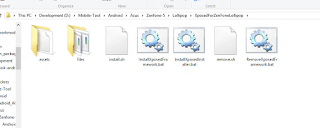
  • After Downloading extract all files into a folder anywhere on your PC. as shown below
  • Now double click on “InstallxposedInstaller.bat“, this will install xposed app on your mobile.
  • After Successful install double click on “InstallxposedFramework.bat” file, this will install framework files in system.
  • To uninstall simply double click on “RemovexposedFramework.bat” and done.

For MAC users :

    • You need to only run “install.sh” file and done.
    • To remove xposed run “remove.sh

Categories
Applications

BBM Beta Pasti Konek (BEGAL)

BBM Beta langsung konek, pasti nyambung tanpa loading. Gak pake ribet, gak pake lama.

Download BBM Beta langsung konek , Thanks untuk tim Begal99, anda luar biasa.

Categories
Firmware

Asus Firmware v.2.22.50.54 All Versions

Version  CN_2.22.50.54

File Size
692,85 (MBytes) 2015.06.05
Download from
Global (DLM) Global P2P

Version  CHT_2.22.50.54

File Size
792,68 (MBytes) 2015.06.05
Download from
Global (DLM) Global P2P

Version  WW_2.22.40.54(MR11.2) 

File Size
777,43 (MBytes) 2015.06.02
Download from
Global (DLM) Global P2P


Version  TW_2.22.40.54(MR11.2) 

File Size
779,99 (MBytes) 2015.06.02
Download from
Global (DLM) Global P2P

Categories
Asus Zenfone Lollipop Firmware

Asus Zenfone Android L (Lollipop) All Versions

Asus Zenfone Android L (Lollipop) All Versions


Version  TW_3.23.40.52 (Android L)

File Size
709,96 (MBytes) 2015.05.28
Download from
Global (DLM) Global P2P
Version  WW_3.23.40.52 (Android L)
File Size
717,21 (MBytes) 2015.05.31
Download from
Global (DLM) Global P2P

Version CN_3.23.40.57 (Android L)

File Size
638,38 (MBytes) 2015.06.25
Download from
Global (DLM) Global P2P

Version CHT_3.23.40.58 (Android L)

File Size
718,29 (MBytes) 2015.06.18
Download from
Global (DLM) Global P2P 
Categories
Firmware

UPDATE Firmware Versi CHT_2.22.50.54

UPDATE Firmware Versi CHT_2.22.50.54
Versi CHT_2.22.50.54

Deskripsi ASUS ZenFone 5(T00F/T00J) software Image: V2.22.40.54 (Android KK) for CHT SKU only*
Improvement Item:

1. To solve no sounds during phone calls.
2. Battery Draining Detection
Add Battery Draining Detection feature
Notify to close or uninstall the battery draining apps when detected.
The disable setting is under the Battery setting.
3. Auto start service manager
Save battery: prevent unwanted services from self-start and to save system memory.
Save memory : Kill services immediately and they won’t be started by Android again.
4. Added ASUS ZenCircle :
Explore and follow the most popular or featured creations
Interact with friends via likes and comments
Share photos to Facebook, LINE, and other social networks
Built-in camera lets you take photos then apply customizable filter effects.
Discover amazing photo stories created using ASUS PixelMaster Camera and ASUS PhotoCollage
5. Added ASUS PhotoCollage:
PhotoCollage features a simple and intuitive interface that uses smart face detection to collage photos using customizable grid templates, to apply magazine-styled themes, and to add instant photo effects to your photo collection. It also includes fun themed stickers, templates for special days, and lots of customization tools that let you add your own personality to your photo collection.

For more information please refer to:
TW:http://www.asus.com/zentalk/tw/ReleaseNotes
WW:http://www.asus.com/zentalk/ReleaseNotes
CN:http://zentalk.asus.com.cn/ReleaseNotes

Steps of Update:
1. Check software version of your device**
2. Download device software and Update SOP (From “Manual” Item)
3. Only apply to same SKU update, Example: WW->WW, CN->CN, TW->TW.
4. Software update cannot transfer the software SKU and downgrade the software version.
5. Wrong SKU may cause update failure, please update the same SKU version only.
*How to know the device model?
Path: Settings->About-> Model number
Example: ASUS_T00I
**How to know the device software version?
Path: Settings->About-> software information->Build number
***System upgrade may cause part of data missing, please buckup your important data before system upgrading.ne calls.

For more information please refer to:
TW:http://www.asus.com/zentalk/tw/ReleaseNotes
WW:http://www.asus.com/zentalk/ReleaseNotes
CN:http://zentalk.asus.com.cn/ReleaseNotes

Steps of Update:
1. Check software version of your device**
2. Download device software and Update SOP (From “Manual” Item)
3. Only apply to same SKU update, Example: WW->WW, CN->CN, TW->TW.
4. Software update cannot transfer the software SKU and downgrade the software version.
5. Wrong SKU may cause update failure, please update the same SKU version only.
*How to know the device model?
Path: Settings->About-> Model number
Example: ASUS_T00I
**How to know the device software version?
Path: Settings->About-> software information->Build number
***System upgrade may cause part of data missing, please buckup your important data before system upgrading.

Ukuran File 774.1 MBytesupdate 2015/06/05
Download dari Global